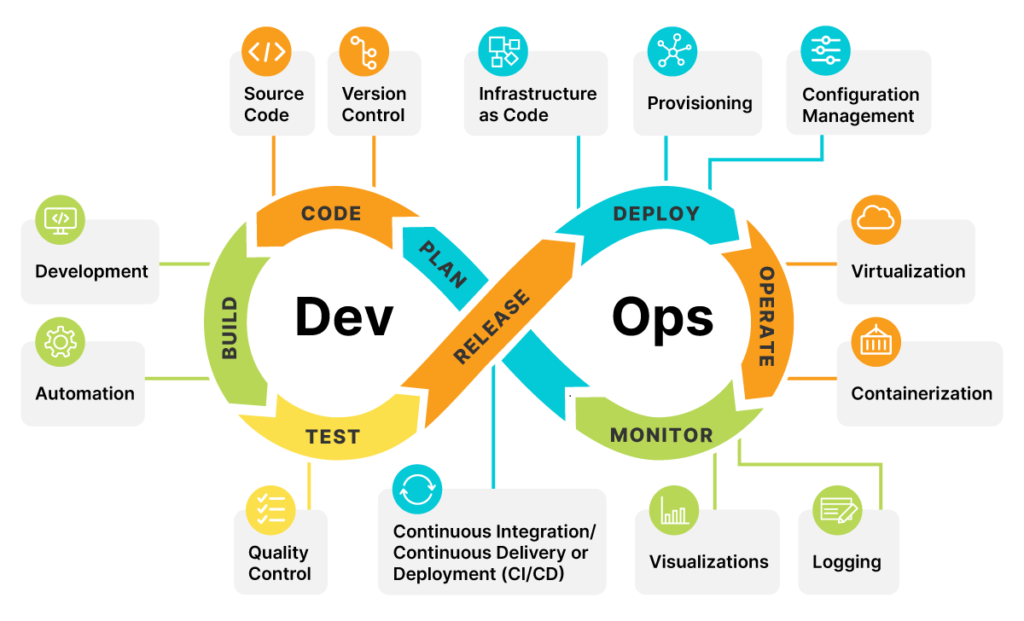
What is DevOps — and why it matters today?
DevOps is not just a tool or a role.
It’s a set of practices that brings Development and Operations together to deliver software faster, safer, and with higher quality.
In today’s world, companies no longer ship massive releases once in a while.
They ship small, frequent changes to get faster customer feedback and reduce risk.
That shift is only possible with DevOps.
At its core, DevOps enables:
✔ Continuous Integration — frequent code merges with automated builds and tests
✔ Continuous Delivery / Deployment — software is always release-ready (or automatically released)
✔ Continuous Testing — quality is built in, not tested at the end
✔ Fast rollback & recovery — failures are expected and handled quickly
DevOps is the foundation of modern software delivery and customer satisfaction.
CI, CD & Continuous Deployment — Often Confused, Implement Well
In DevOps, Continuous Integration, Continuous Delivery, and Continuous Deployment are foundational — but they are often misunderstood.
Continuous Integration (CI)
CI is about discipline. Developers frequently merge code into a shared repository, triggering automated builds and tests.
The goal is simple: detect issues early and keep the main branch always healthy.
CI focuses on the build and integration stage.
Continuous Delivery (CD)
Continuous Delivery extends CI by adding automated testing and deployment pipelines.
The application is always production-ready, but the final release is a manual or business-driven decision.
CD ensures confidence and control.
Continuous Deployment
With Continuous Deployment, every change that passes the pipeline is automatically released to production — no human intervention.
This enables rapid feedback, smaller blast radius, and frequent production releases.
Continuous Deployment requires Continuous Delivery, but not the other way around.
CI/CD Tooling
Tools like Jenkins and GitLab CI/CD help automate these pipelines:
-
Jenkins offers flexibility and a vast plugin ecosystem for complex, customized workflows
-
GitLab CI/CD provides tightly integrated pipelines from code to production
That said, tools alone don’t solve delivery problems.
Clear pipelines, strong automation, and ownership across teams do.
Infrastructure as Code (IaC): The Backbone of Scalable Cloud Platforms
Infrastructure as Code (IaC) is the practice of defining and managing infrastructure using code, the same way we manage application software.
When done right, IaC changes infrastructure from a manual task into a repeatable, automated, and reliable system.
Why IaC matters in DevOps:
✔ Automation
Infrastructure provisioning, configuration, and updates become fully automated — reducing manual effort and human error.
✔ Consistency
Infrastructure is version-controlled, reviewable, and testable.
What runs in production is exactly what was defined in code — no surprises.
✔ Scalability
Need to scale environments or spin up new ones?
IaC enables infrastructure to grow on demand, not through tickets and scripts.
✔ Collaboration
Infrastructure definitions live alongside application code, enabling better collaboration between Dev, Ops, and Platform teams.
✔ Faster Recovery
In failure scenarios, environments can be rebuilt quickly and predictably using the same codebase.
IaC Tooling
Tools like Terraform have become industry standards for IaC:
-
Cloud-agnostic and declarative
-
Supports modular, reusable infrastructure design
-
Enables safe, scalable provisioning across environments
Tools matter — but the real value comes from treating infrastructure like a product, not a one-time setup.
Why Infrastructure as Code (IaC) Fails in Many Organizations
Infrastructure as Code is widely adopted — yet in many teams, it fails to deliver its promise.
Not because of tools.
But because of how it’s implemented.
Here are the most common reasons IaC fails:
❌ IaC is treated like a one-time setup
Infrastructure code is written once, deployed, and forgotten.
IaC must evolve continuously — just like application code.
❌ No versioning, reviews, or standards
Without proper version control, code reviews, and naming standards, IaC quickly becomes unmanageable.
❌ Environment drift is ignored
Manual changes in cloud consoles break the contract.
If the real infrastructure doesn’t match the code, IaC loses trust.
❌ Monolithic Terraform files
Large, unstructured configurations make changes risky and slow.
Modularity is not optional at scale.
❌ Security & cost are afterthoughts
Secrets, IAM, policies, and budgets are often bolted on later — when they should be part of the design.
❌ No ownership model
If everyone can change infrastructure, no one is accountable for it.
✅ When IaC Actually Works
IaC succeeds when organizations:
✔ Treat infrastructure code as a product
✔ Enforce reviews, testing, and standards
✔ Prevent drift and manual changes
✔ Design for reuse, security, and scale
✔ Assign clear ownership
IaC doesn’t fail because it’s complex.
It fails because it’s not taken seriously enough.
DevOps Without Version Control Is a Risk — Not a Strategy
You can automate pipelines. You can deploy to the cloud. But without version control, DevOps doesn’t scale.
Version control systems like Git are not just for storing code. They are the foundation of collaboration, traceability, and reliable delivery.
Here’s why Git is non-negotiable in DevOps:
Collaboration at Scale
Teams work in parallel without stepping on each other’s changes.
Branches and pull requests create structure, not chaos.
Traceability & Accountability
Every change has an owner, a reason, and a history.
This makes debugging and root cause analysis possible — not guesswork.
Repeatability & Reliability
Applications, configs, pipelines, and infrastructure live in Git.
If it’s versioned, it’s reproducible. If it’s not, it’s a risk.
Safer Change Management
Reviews and approvals act as quality gates, reducing production issues.
Built-in Resilience
Distributed version control ensures work can continue even if the central server is unavailable. In real-world DevOps, Git becomes the single source of truth.
If it’s not in Git, it doesn’t exist.
DevSecOps — Security by Design, Not by Approval
DevSecOps means integrating security automatically and continuously into every stage of DevOps — from code commit to production and recovery.
It’s not a separate phase.
It’s how modern platforms are built.
DevSecOps embeds automated security into CI, CD, and runtime so every release is secure by design — not gated by manual approvals.
What Makes DevSecOps Work
DevSecOps succeeds when:
✔ Security starts early
✔ Security is automated
✔ Security is developer-friendly
✔ Security is part of the platform, not a side team
Tools help — but culture and automation make it sustainable.
How Security Integrates Across the Lifecycle
1️⃣ Security in CI (Code Commit → Build)
When code is committed to GitHub, security starts immediately:
-
SAST detects insecure coding patterns
-
Java: SonarQube, Checkmarx
-
C/C++: Coverity, CodeQL
-
-
SCA scans third-party libraries for known vulnerabilities
-
Java: Black Duck, Snyk, OWASP Dependency-Check
-
C/C++: Black Duck, Snyk
-
-
Policy & guardrails ensure approved libraries, licenses, and configs
-
OPA, Checkov
-
Issues are caught before they become builds.
2️⃣ Security During Build (Artifacts & Images)
When binaries or Docker images are created:
-
Container image scanning validates OS and package vulnerabilities
-
Trivy, Anchore, Aqua, Clair, Snyk
-
-
Secure artifact promotion ensures only scanned artifacts move forward
-
Artifactory, ECR image scanning
-
Only trusted artifacts progress through the pipeline.
3️⃣ Security in CD (Deployment Phase)
Before and during deployment:
-
Infrastructure & config validation prevents misconfigurations
-
Terraform + Checkov, tfsec, OPA
-
-
Secrets management removes credentials from code and pipelines
-
AWS Secrets Manager, Vault, Kubernetes Secrets
-
Deployments are secure by default, not manually reviewed.
4️⃣ Security After Deployment (Runtime & Operations)
Once applications are live:
-
Runtime threat detection & access control
-
Falco, GuardDuty, cloud-native security services
-
-
Drift detection & recovery using code-based rebuilds and rollbacks
Security continues in production — not just before it.
Why It’s Called Continuous Security
Security runs:
-
On every commit
-
On every build
-
On every deployment
-
During runtime and recovery
It’s automated, consistent, and shared.
So, DevSecOps is not about adding more tools. It’s about making the secure path the easiest path.
When security becomes invisible, automated, and embedded, teams move faster and safer.
Shift-Left Testing in a DevOps Pipeline
In a mature DevOps setup, testing is continuous, not a final phase.
Different test types are introduced at different stages of the pipeline.
1️⃣ Unit Testing (Code Commit & Early CI)
-
Tests individual functions or components
-
Fully automated and executed on every commit
-
Integrated directly into the developer workflow
Catches logic errors before code is merged
2️⃣ Integration Testing (Post-Build / Test Environment)
-
Validates interaction between multiple components
-
Ensures services work together correctly
-
Often includes sanity and critical (P0) tests
Prevents broken integrations from moving forward
3️⃣ System Testing (End-to-End Validation)
-
Tests the complete system against functional requirements
-
Usually executed after integration testing
-
Often handled outside the core CI/CD pipeline
Validates overall system behavior
4️⃣ Acceptance Testing (Business Validation)
-
Confirms the system meets customer expectations
-
Can be manual or automated
-
Typically performed before final release approval
Ensures business readiness
5️⃣ Performance Testing
-
Evaluates behavior under load and stress
-
Identifies bottlenecks and scalability limits
-
Usually executed periodically or before major releases
Protects user experience at scale
6️⃣ Security Testing (Shifted as Early as Possible)
-
Static code analysis and dependency checks
-
Automated security scans integrated into CI/CD
-
Detects vulnerabilities before deployment
Reduces security risk early instead of post-release
Why Shift-Left Testing Matters
✔ Defects are found earlier
✔ Fixes are cheaper and faster
✔ Main/integration branches stay stable
✔ Production risk is reduced
✔ Delivery speed improves without sacrificing quality
Shift-left testing doesn’t eliminate later testing —
it distributes quality checks across the pipeline.
Quality cannot be tested into software at the end. It must be built in from the beginning.
That’s the real power of shift-left testing in DevOps.
Monitoring, Logging & Observability — The Real Backbone of DevOps
After years of working with DevOps platforms, I’ve realized one thing:
If you can’t see what your system is doing, you can’t improve it — and you definitely can’t trust it.
That’s where monitoring, logging, and observability come in.
They don’t just tell you when something breaks — they help you predict, prevent, and fix issues faster.
Why Monitoring & Logging Matter
Proactive Issue Detection
When traffic spikes, latency increases, or error rates climb, monitoring alerts you before users feel it.
Faster Incident Resolution
Logs tell you what happened, where, and why — instead of guessing during outages.
Continuous Improvement
Trends reveal slow memory leaks, performance drifts, and bottlenecks over time.
Compliance & Security
Audit logs help meet regulatory requirements and track suspicious activity.
In short:
better visibility = fewer surprises = happier users.
Observability — Going Beyond Traditional Monitoring
Observability is not just about collecting data.
It’s about being able to ask questions about your system — even questions you didn’t plan for.
Here’s how good observability works:
1️⃣ Collect the right signals
Metrics, logs, traces — not noise.
2️⃣ Instrument everything
Apps, infrastructure, pipelines, gateways — visibility end-to-end.
3️⃣ Correlate data
See how a slow API call links to DB latency, deployments, or config changes.
4️⃣ Analyze & alert intelligently
Visual dashboards, anomaly detection, meaningful alerts — not alert fatigue.
5️⃣ Act fast
Insights must drive response, automation, and post-incident learning.
When observability is done right, teams go from:
❌ “Something is broken — but we don’t know what”
➡️
✅ “We know what failed, why, and how to fix it — quickly.”
Final Thought
DevOps is not only about speed.
It’s about safe speed — and that’s only possible when systems are visible, measurable, and predictable.
Monitoring + Logging + Observability = Reliability.
IaaS vs PaaS — What DevOps Teams Actually Gain
In DevOps, speed matters — but control and reliability matter more. That’s why most teams use a mix of IaaS and PaaS.
IaaS (Infrastructure as a Service)
Cloud provider gives you servers, storage, networking. You control OS, runtimes, deployments.
Use when you need flexibility + custom setups.
Examples: AWS EC2 | Azure VMs | Google Compute Engine
Typical DevOps use cases:
-
Spin up test/stage/production quickly
-
Custom networking & security
-
Lift-and-shift migrations
PaaS (Platform as a Service)
Cloud provider gives you a ready platform to run apps. You focus on code — platform handles scaling, patches, runtime.
Use when speed and simplicity matter.
Examples: AWS Elastic Beanstalk | Azure App Service | Google App Engine | Heroku
Typical DevOps use cases:
-
Rapid feature delivery
-
Microservices
-
Auto-scaling apps with minimal ops work
Why Both Matter in DevOps
✔ IaaS → control & flexibility
✔ PaaS → speed & automation
AWS Elastic Beanstalk —
AWS Elastic Beanstalk is a Platform as a Service (PaaS) that allows developers to deploy applications without manually managing servers, operating systems, or scaling. You simply upload your code, and Elastic Beanstalk automatically provisions the required EC2 instances, configures networking and load balancers, deploys the application, and scales it based on demand. At the same time, it still allows customization when needed, so teams can fine-tune infrastructure while benefiting from automation. Elastic Beanstalk is commonly used for web applications, APIs, and backend services where teams want speed, simplicity, and control together.
Google App Engine —
Google App Engine is a fully managed PaaS platform designed to run applications with almost zero infrastructure management. Developers upload their code, and Google automatically handles containerization, traffic management, auto-scaling, security patches, and runtime updates. Unlike Elastic Beanstalk, App Engine offers less infrastructure control, but it provides an extremely simple and automated experience — often scaling applications from zero users to thousands with no manual effort. It is widely used for web applications, backend APIs, and event-driven applications where teams want to focus entirely on writing features rather than operating servers.
When NOT to Use AWS Elastic Beanstalk or Google App Engine
• You need deep control over OS, networking, or security hardening.
• Your architecture has many microservices or requires service mesh-level control.
• Workloads are large, predictable, and cost optimization is the top priority.
• You need hybrid/on-prem deployments or strict non-cloud compliance.
• You want to avoid strong vendor lock-in and need portability across clouds.
• Your workloads are highly event-driven (serverless is a better fit).
• You require custom runtimes, drivers, or non-supported frameworks.
• You need advanced observability, debugging, and deployment control beyond what PaaS offers.
Immutable Infrastructure — Why Modern DevOps Teams Use It
In DevOps, immutable infrastructure means:
Instead of modifying servers, we replace them with new ones built from a known, tested image.
No manual patching.
No hot fixes on live machines.
No “snowflake” servers.
If something needs to change → build new, deploy, replace.
Why This Approach Works
⚡ Scalability
New instances can be created instantly from the same image — making it easy to scale up and down consistently.
Reliability
No configuration drift.
Every server is identical, predictable, and fully tested before it runs.
Security
Systems are rebuilt cleanly instead of being patched repeatedly — reducing hidden vulnerabilities and unauthorized changes.
How Teams Implement Immutable Infrastructure
Here are common tools and techniques:
✔ Infrastructure as Code (IaC)
Terraform, AWS CloudFormation
→ Rebuild infrastructure consistently from code.
✔ Containerization
Docker
→ Application + dependencies packaged as immutable images.
✔ Orchestration
Kubernetes, ECS
→ Replace failing containers automatically, scale reliably.
✔ Golden Images / AMIs
Packer, AWS AMIs
→ Pre-baked, versioned server images.
✔ CI/CD Automation
Pipelines automatically build and deploy new instances instead of modifying existing ones.
Simple Way to Remember
❌ Old approach: “Log into the server and fix it.”
✅ Immutable approach: “Replace the server with a clean one.”
And that’s why modern DevOps platforms feel more stable, scalable, and secure.
CI/CD pipeline tools and why
Version control
Git (GitHub / Bitbucket / GitLab) — track code, collaborate, audit changes.
CI/CD automation
Jenkins / GitLab CI / GitHub Actions — build, test, deploy automatically.
Testing
Unit, API, and Selenium tests — catch defects early.
Artifact repository
JFrog Artifactory / Nexus — store and version build artifacts.
Infrastructure as Code
Terraform — create environments consistently.
Ansible — configure systems automatically.
Images and packaging
Packer — build base images.
Docker — containerize applications.
Orchestration
Kubernetes (EKS) — scale, self-heal, manage containers.
Code quality and security
SonarQube — static code analysis.
Security scanners — dependency and image checks.
Monitoring
CloudWatch / Prometheus / Grafana — alerting, metrics, system health.
Cloud platform
AWS (or Azure / GCP) — scalable infrastructure for deployments.
How to Monitor Applications the Right Way (Performance, Uptime & Errors)
Once an application goes live, deployment is not the finish line — visibility is.
Monitoring helps teams detect issues early, protect user experience, and fix problems before they become incidents.
Here’s how I look at it
1️⃣ Application Performance (APM)
Track response time, latency, throughput & error trends.
Tools: New Relic, Datadog, AppDynamics
These tools help identify slow APIs, memory leaks, DB bottlenecks, and user-impacting delays.
2️⃣ Logs & Error Tracking
Logs answer one question: “What actually happened?”
Centralize and search logs across services.
Tools: Splunk
Error tracking: Sentry, Rollbar
This makes debugging faster and provides incident history.
3️⃣ Synthetic Monitoring
Simulate real users hitting your app from different locations.
Tools: Pingdom, Uptrends
Great for catching login failures, broken pages, or DNS issues before users do.
️ 4️⃣ Infrastructure & System Health
Monitor servers, databases, containers, and network.
Tools: Prometheus, Grafana, Zabbix, Nagios
Because sometimes the app is fine — but the infrastructure isn’t.
5️⃣ Smart Alerts
Notify the right people at the right time — not spam.
Tools: PagerDuty, Slack integrations
Alerts tied to SLAs/SLOs help teams react fast and avoid alert fatigue.
The Goal
Observability is not just monitoring dashboards — it’s about answering questions fast.
Good monitoring means:
✔ Faster incident detection
✔ Fewer outages
✔ Better user experience
✔ Continuous learning after incidents
That’s how strong DevOps teams operate.
Describe how you would handle an incident where the application goes down after deployment. What steps would you take to identify and resolve the issue quickly?
First of all, I will use a deployment strategy with the least downtime .. like Rolling deployment or blue-green deployment. By using these deployments if the application goes down after deployment, we can quickly roll back to the previous deployment having short downtime and min user impact.
Also, the application going down after deployment is a critical issue that needs to be resolved quickly to minimize the impact on users. Here are some steps that I will take to identify and resolve the issue:
Notify stakeholders: The first step is to notify all stakeholders, including developers, operations teams, and business users, that the application is down. This can be done via email, messaging tools, or phone calls.
Check system status: Check the status of the underlying infrastructure, including servers, databases, and networking components, to ensure that they are all up and running.
Check application logs: Check the application logs to identify any errors or issues that may have caused the outage. This can help to pinpoint the root cause of the problem.
Roll back changes
Conduct a post-mortem analysis: Once the incident has been resolved, conduct a post-mortem analysis (RCA) to identify the root cause of the issue and determine what steps can be taken to prevent similar incidents from happening in the future.
Communicate with stakeholders: Once the incident has been resolved and a post-mortem analysis has been conducted, communicate the findings and any steps taken to prevent similar incidents to stakeholders.
How would you manage configuration and environment variables for the application, such as database connection strings, API keys, and other sensitive information?
Managing configuration and environment variables is an essential part of deploying and managing an application.
I generally recommend using secure key-value stores to store secrets such as API keys, database connection strings, and other sensitive information. AWS Secrets Manager can be used to securely store secrets.
Various credentials used in Jenkins jobs can be stored in Jenkins credential manager.
I also implement access controls – Implementing access controls to ensure that only authorized users can access sensitive information and configuration settings.
How would you handle versioning and release management of the application to ensure smooth deployments and rollbacks, if needed?
Proper versioning and release management are critical for ensuring smooth deployments and rollbacks of an application. Here are some best practices for
managing versioning and releases:
Use semantic versioning: Use semantic versioning to identify the version of the application. Semantic versioning involves using a three-part version number that includes a major version number, a minor version number, and a patch number. The major version number is incremented when there are major changes to the application, the minor version number is incremented when new features are added, and the patch number is incremented for bug fixes.
In my current org, we use version like 02.00.00, 02.01.00 , 02.01.05 and for
development purpose we use r9integ, r8integ and so on.
Use a version control system: Use a version control system like Git to manage changes to the application’s source code. This allows for easy tracking of changes and the ability to revert to previous versions if needed.
Use a release management tool: Use a release management tool like Jenkins to automate the process of building, testing, and deploying new versions of the application. This helps to ensure that each release is properly tested before deployment and reduces the risk of errors or issues during deployment.
Automate deployments: Automate the deployment process using tools like packer, terraform, AWS to ensure consistent and repeatable deployments. This also makes it easier to roll back to a previous version if needed.
Conduct thorough testing: Before releasing a new version of the application, conduct thorough testing to identify and fix any issues before deployment. This can include unit tests, integration tests, and end-to-end tests.
Plan for rollbacks: Plan for rollbacks in case something goes wrong during deployment. This can include having a backup plan and ensuring that all versions of the application are properly tagged and stored.
By following these best practices, it is possible to manage the versioning and releases of an application in a way that ensures smooth deployments and rollbacks if needed. This helps to minimize downtime and ensure that the application is functioning correctly for users.
Describe your approach to handling backups and disaster recovery for the application and its underlying infrastructure.
My approach to handling backups and disaster recovery for the application and its underlying infrastructure is to Implement high availability and multi-region architecture, by using AWS services like Elastic Load Balancing, Amazon Route 53, and Auto Scaling. This helps to ensure that the application is always available and can tolerate failures.
I can also use various AWS services to backup, restore, and for disaster recovery like – AWS Backup, and AWS Disaster Recovery.
I will use Amazon S3 for backup storage as S3 is a highly durable and scalable object storage service that can be used to store backups. It allows to define of retention policies, lifecycle rules, and versioning to manage backup data.
How would you collaborate with development, operations, and other stakeholders to ensure a smooth and efficient deployment process?
I will establish clear communication channels to ensure that all stakeholders are aware of the deployment process, including timelines, responsibilities, and potential risks. This can include regular meetings, emails, and other forms of communication. I will establish a clear deployment process that outlines the steps involved in deploying the application, including testing, validation, and rollbacks. This should be documented and communicated to all stakeholders.
I will also work for continuous improvement in the deployment process. I will be taking regular feedback from stakeholders and monitoring performance metrics, and implementing changes based on lessons learned.